Rollup Wizard
Illustrators can now create quick sums, counts, and averages across boxes through the new Rollup Wizard available in the Lens Styles menu.
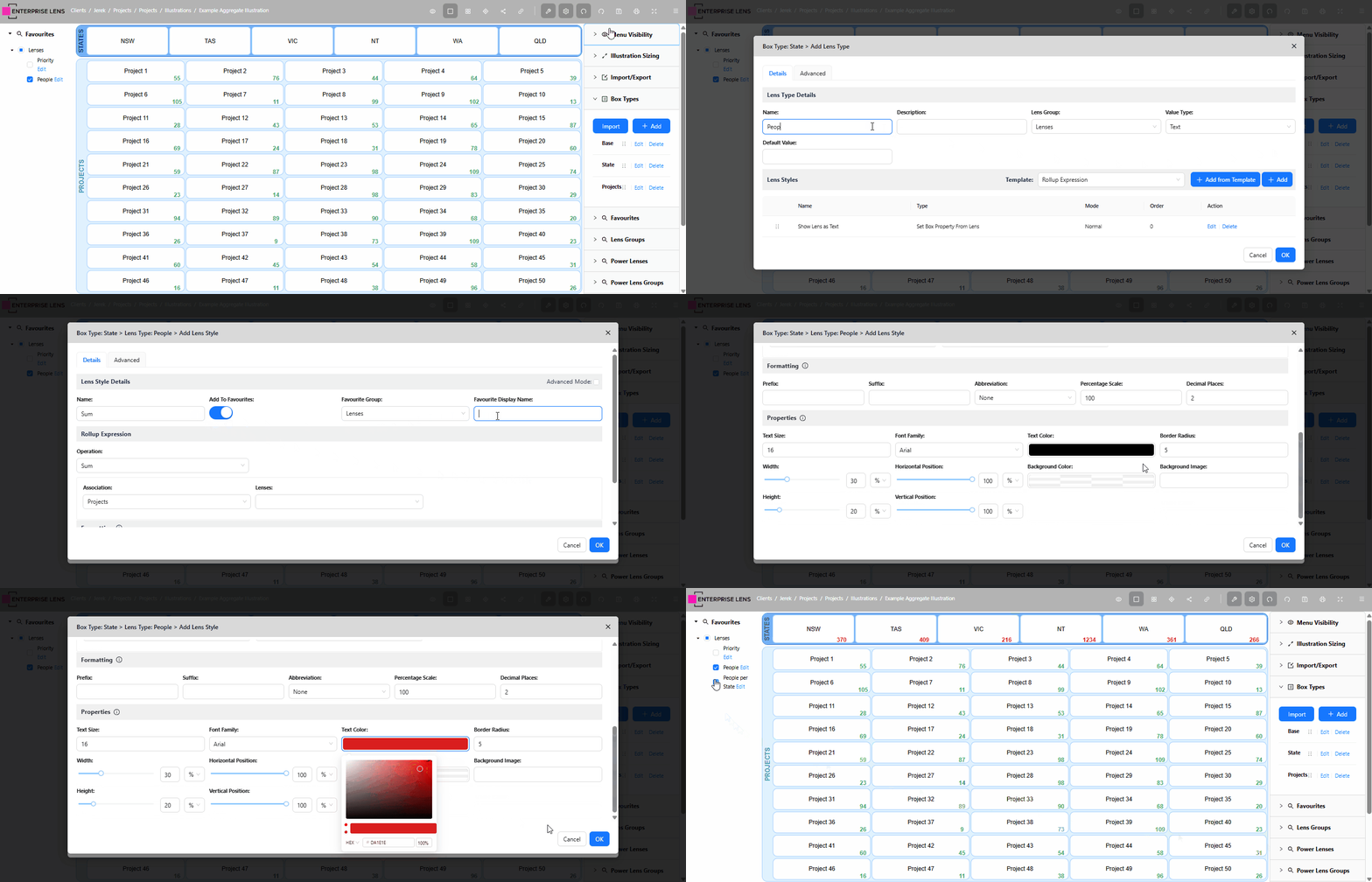
In the above example, the illustrator was able to quickly create a Sum of all People per State, located on the bottom right of every State box using our new Rollup Wizard.
1. How it works
1.1. Select a Box Type
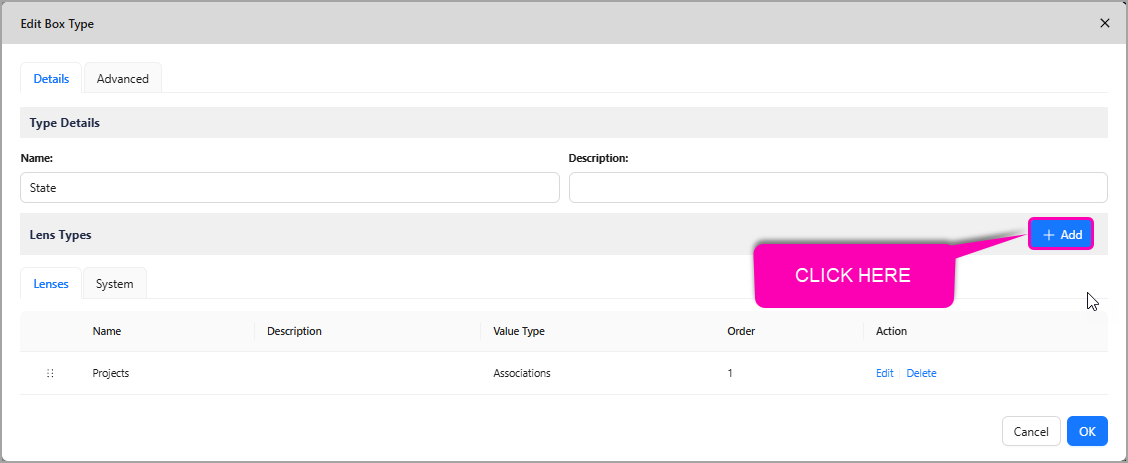
Open the Box Type you wish to create your aggregate lens on, and click the + Add button to create a new Lens
1.2. Create a Lens
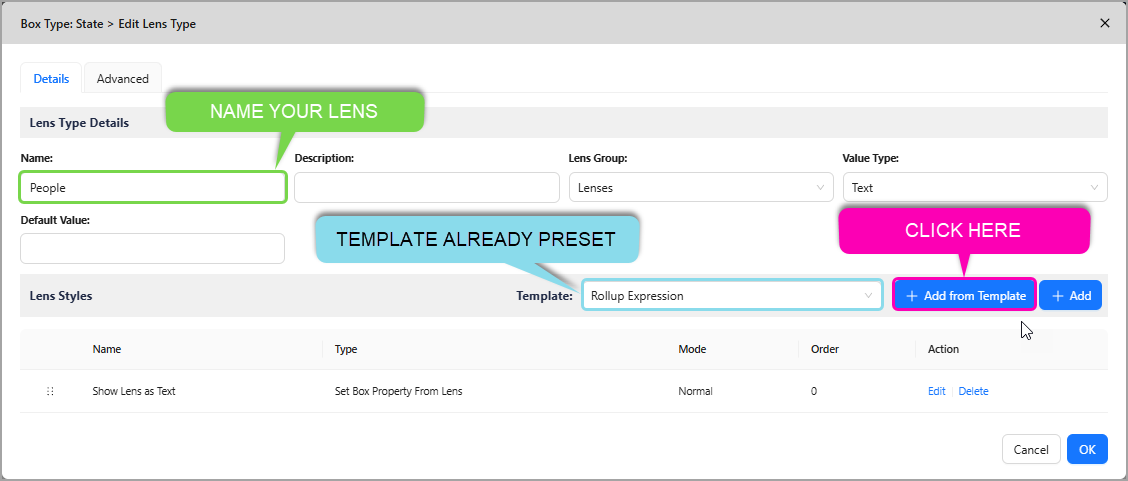
Name your new Lens Type, and click the + Add from Template button.
The Rollup template has already been preset for your convenience.
1.3. Create a Lens Style
-
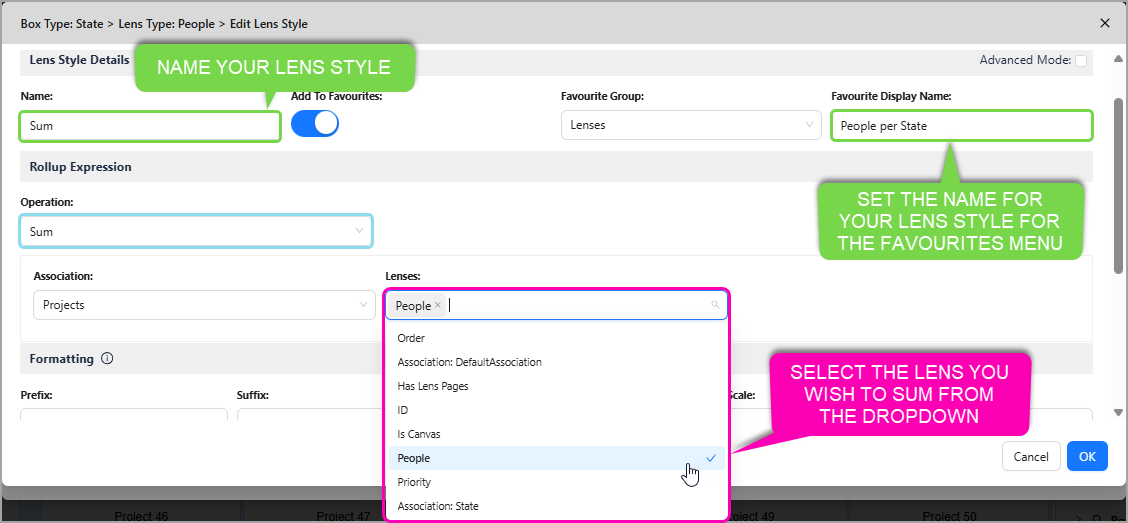
Set a Name for your Lens Style
-
Toggle whether you want to show this Lens Style in the Favourites Menu. By default, this is turned on
-
Set a Favourites Group for your Lens Style to appear under, by default this is set to the highest Favourites Group in your illustration
-
Set a Favourites Display Name, which is the name used in the Left Hand Menu under your Favourites
-
Select an Operation, by default it is
Sum- You can also Count, Average, and calculate Minimum and Maximum values
-
Select an Association to the Box Type you would like to sum, this is often automatically set for your convenience
-
Select a Lens to apply an operation to, in this case it is a Sum
Below is an annotated image showing which sections of the menu you would typically need to modify. The other options not highlighted are typically prefilled and do not need to be modified.
1.4. Format the Lens
Now you can customise the Formatting of your new Lens Style.
- We have curated several common options based on User Feedback for you to customise your Lens Style with
- In our example, we only changed the Text Colour, with all other presets untouched.
- All our preset values are set-and-forget by nature, while still remaining customisable to your liking
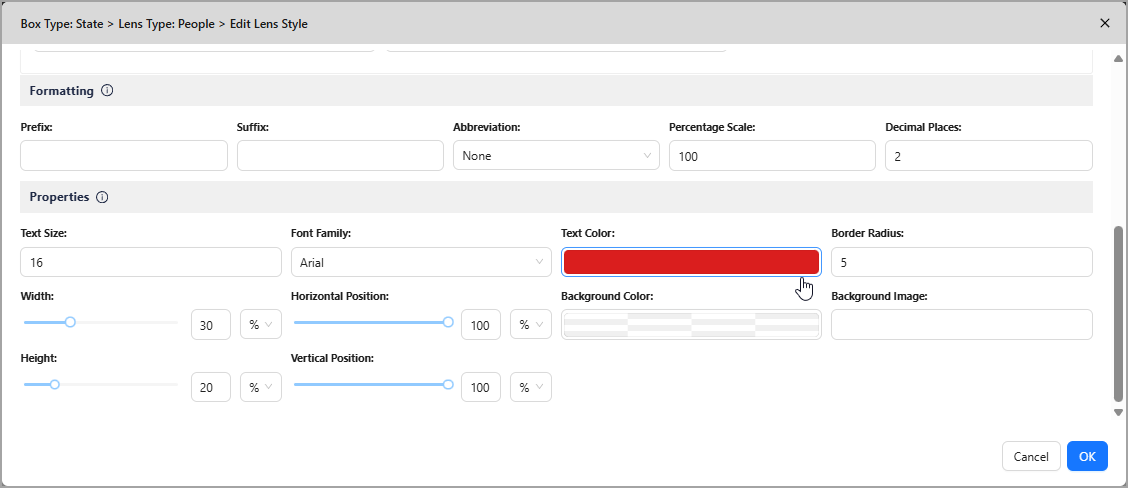
1.4.1. Available Formatting Options
| Setting | Description | Options | Examples |
|---|---|---|---|
| Prefix | Appends characters to the front of your Lens value. | Any characters you enter. Default: (Blank) | $value£value |
| Suffix | Appends characters to the end of your Lens value. | Any characters you enter. Default: (Blank) | value kmvalue sqmvalue² |
| Abbreviation | Only for lenses with Number values!Shortens a number by dividing it by a common divisor. Often paired with Decimal Places | NoneAutoThousand (K)Million (M)Billion (B)Default: None | 1,000,000 -> 1 (Million)372,101 -> 372.101 (Thousand)8045615270 -> 8.045615270 (Auto, Billion) |
| Percentage Scale | Only for lenses with Number values!Multiplies a number by a whole number percentage. | Any number you enter. Default: 100 (no change) | 100:281 -> 28175:100 -> 75250:4492 -> 11230 |
| Decimal Place | Only for lenses with Number values!Rounds a number to the specified number of decimal places. | Any number you enter. Default: 2 | 0:281.7322673 -> 2822:281.7322673 -> 281.734:281.7322673 -> 281.7323 |
| Text Size | The size of the text shown in your Lens. | Any number you enter. Default: 16 | See default. |
| Font Family | The font of the text shown in your Lens. | ArialCourier NewTahomaTimes New RomanDefault: Arial | See default. |
| Text Colour | The colour of the text shown in your Lens. | Any HEX value you select. Default: #000000 | See default. |
| Text Size | The size of the text shown in your Lens. | Any number you enter. Default: 16 | See default. |
| Border Radius | The roundness of your Lens' corners. | Any number you enter. Default: 5 | See default. |
| Width | The width of your lens, which can be expressed as a Percentage (%) or in Pixels (px). | Any number you enter. Default: 30% | See default. |
| Height | The height of your lens, which can be expressed as a Percentage (%) or in Pixels (px). | Any number you enter. Default: 20% | See default. |
| Horizontal Position | The horizontal position of your lens relative to the boxes it sits in, which can be expressed as a Percentage (%) or in Pixels (px). | Any number you enter. Default: 100% | See default. |
| Vertical Position | The vertical position of your lens relative to the boxes it sits in, which can be expressed as a Percentage (%) or in Pixels (px). | Any number you enter. Default: 100% | See default. |
| Background Colour | The background colour of the content displayed in your Lens. | Any HEX value you select. Default: #FFFFFF00 | See default. |
| Background Image | The background image of the content displayed in your Lens. | Any URL you enter. Default: (Blank) | https://www.myenterpriselens.com/whitelabel/images/el-login-logo.svg |